Pipedrive stays your pipeline. fieldbrain fills it from the conversation.
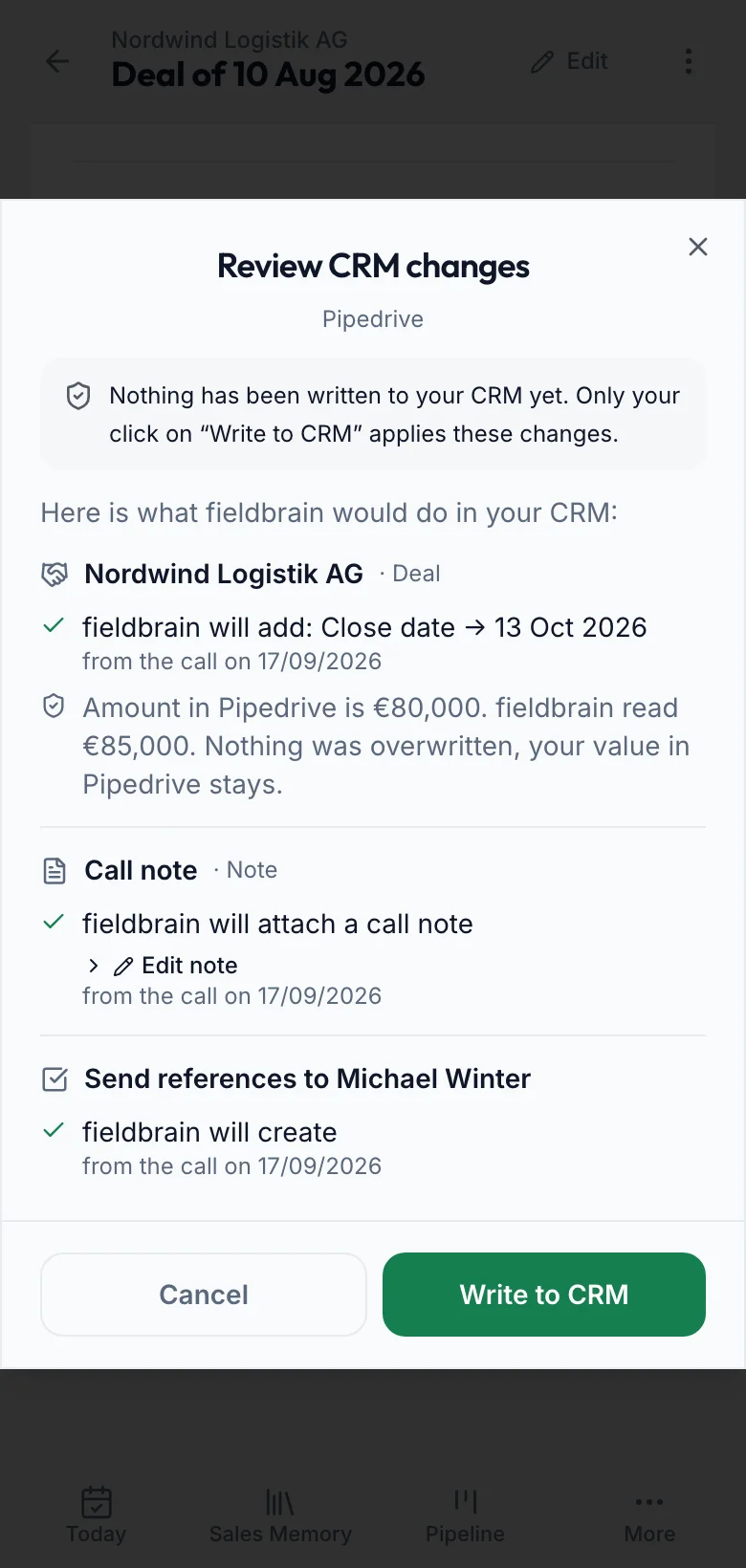
Organization, person, deal, note and activities: fieldbrain shows what will arrive. If a value differs, you decide.
In short
- Do we need to change Pipedrive?
- No. fieldbrain connects with your personal API token and uses your existing stages.
- Does fieldbrain overwrite our data?
- Only if you explicitly choose so. Empty fields are filled, differing values stay until you decide otherwise in the review.
- Will duplicates appear?
- Organization, person and deal are matched. If several deals fit, you pick one or explicitly create a new one.
- What do we see before a transfer?
- Every planned change with old and new value, the full note and every activity. Nothing is written until you click.
What arrives in Pipedrive
What fieldbrain reads
Your stages, organizations and persons for matching, an organization's existing deals, the current state of a deal before every write, and existing activities.
What stays unchanged
The stage of an existing deal, existing organizations and persons, and everything fieldbrain did not create. fieldbrain deletes nothing and does not recreate deleted notes or activities.
For your IT
Access and permissions
A personal API token from your Pipedrive settings. New deals belong to the Pipedrive user of that token. CRM sync is part of Professional and above.
Stages and pipelines
fieldbrain maps by the names of your real stages, first exactly, then by meaning. This works when your account has one pipeline; if the mapping is unclear, fieldbrain sets no stage and shows it in the review. Won and lost set the status, not a stage.
Matching and duplicates
Organization: comparison without legal form. Person: email, then phone; never by name alone. Deal: matched against the organization's existing deals. If anything is unclear or unreadable, nothing is created. fieldbrain remembers notes and activities and does not create them twice.
Conflicts
fieldbrain fills empty fields and shows differing ones as a conflict. For amount, probability and close date you can choose »use fieldbrain«; before writing, fieldbrain re-checks whether the value in Pipedrive has changed since. »Keep Pipedrive value« is remembered for exactly that pair of values.
Rate limits and errors
On a rate limit, fieldbrain waits the stated time and retries up to three times. Creating requests are not repeated after a server error. If Pipedrive rejects a single field, only that field is dropped. Activities for a deal that was not created are skipped. Every run is logged, without content.
Disconnecting
You can disconnect at any time. fieldbrain then writes nothing more to Pipedrive; what is already there stays.
Questions about Pipedrive
Does fieldbrain support our stages?
Yes, by the names of your real stages. fieldbrain never changes the stage of an existing deal; with several pipelines we align the mapping during setup.
What if several deals fit?
Then fieldbrain writes nothing until you pick the right deal in the review or explicitly create a new one.
Are appointments transferred?
Only confirmed ones. A merely proposed appointment appears in the note but is not created as an activity.
Who becomes the owner?
New deals belong to the Pipedrive user whose token is connected.
Does transferred data stay after disconnecting?
Yes. fieldbrain never deletes anything in Pipedrive.
See live how Sales Memory works in your sales.