HubSpot stays your system. fieldbrain adds what's missing.
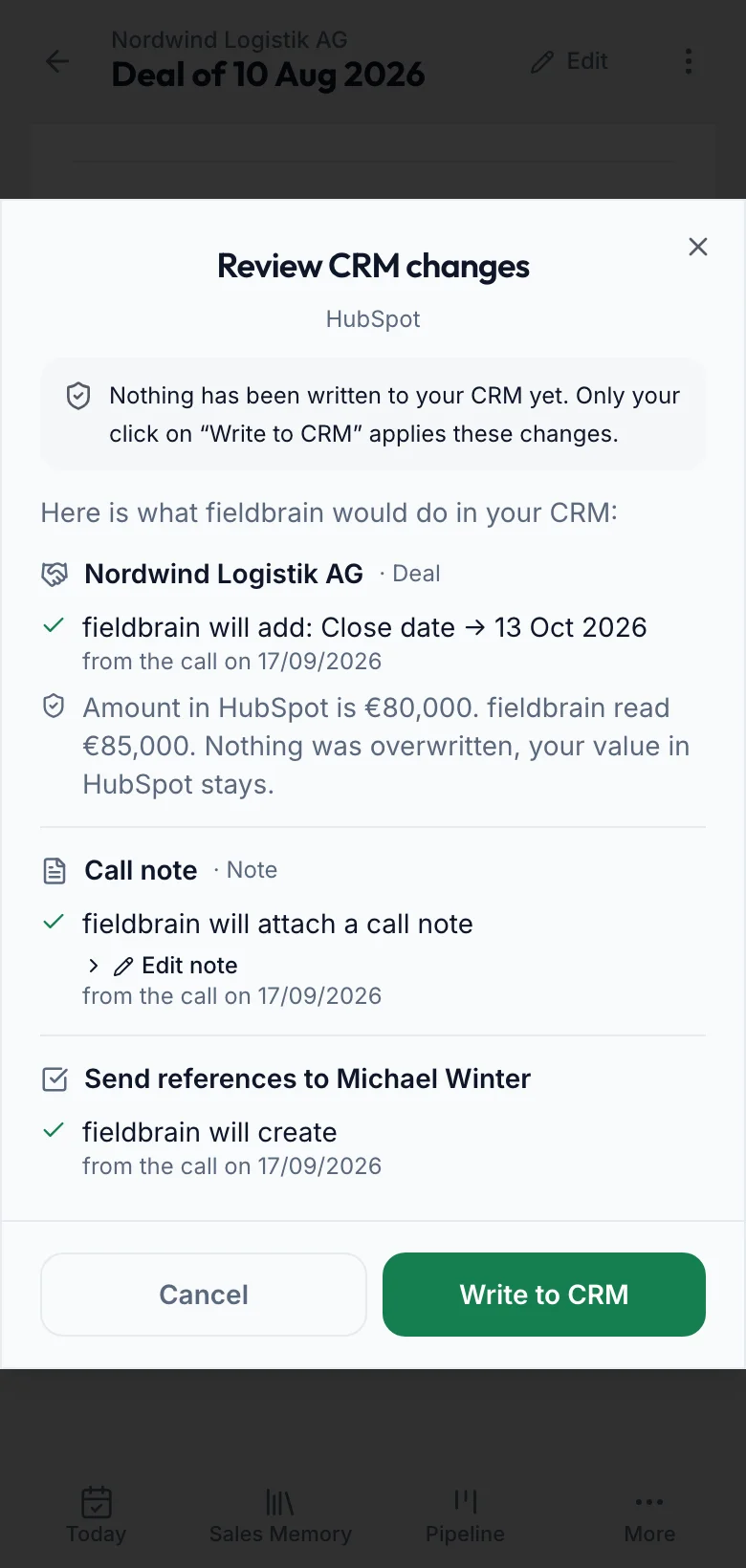
Speak after the conversation, see what would reach HubSpot, and only then approve. Empty fields are filled, differing values stay.
In short
- Do we need to change HubSpot?
- No. fieldbrain uses HubSpot's standard objects and connects with a private app token.
- Does fieldbrain overwrite our data?
- No. Empty fields are filled. If a value differs, fieldbrain shows both and keeps yours.
- Will duplicates appear?
- Company and contact are searched first. If the result is not unique, fieldbrain creates nothing.
- What do we see before a transfer?
- Every planned change with its old and new value. Nothing is written until you click »Write to CRM«.
What arrives in HubSpot
What fieldbrain reads
Companies and contacts for matching, the current values of an existing deal before every write and, if you set a default owner, your owners.
What stays unchanged
Existing companies and contacts, a reassigned owner and everything fieldbrain did not create. fieldbrain deletes nothing. Proposed appointments and past close dates are not written.
For your IT
Access and permissions
A private app token for your HubSpot account with read and write access to companies, contacts, deals, notes, tasks and meetings, plus read access to owners if you set a default owner. CRM sync is part of Professional and above.
Stages and pipelines
New deals are created in the default pipeline; lead, qualified, proposal, negotiation, won and lost map to its stages. On existing deals the stage is treated like any field: a different value is a conflict, not a change. Custom pipelines are aligned during setup.
Matching and duplicates
Company: exact name, then a comparison without legal form. Contact: email, then phone, then name within the company. More than one hit counts as unclear, then nothing is linked or created. fieldbrain remembers what it created: one note per conversation, one task per activity, even on re-transfer.
Conflicts
If a deal field is empty, fieldbrain fills it. If it holds a different value, the review shows both and writes nothing. If current values cannot be read, fieldbrain skips the change entirely.
Rate limits and errors
On a rate limit, fieldbrain waits the time HubSpot names and retries up to three times. Creating requests are not repeated after a server error, so no duplicates appear. A request without an answer counts as attempted, not applied. Every run is logged, without content.
Disconnecting
You can disconnect at any time. fieldbrain then writes nothing more to HubSpot; what is already there stays.
Questions about HubSpot
Does fieldbrain find deals that already exist in HubSpot?
Deals fieldbrain created are recognised and updated. Deals you created before without fieldbrain are not searched automatically; we agree how to handle them during setup.
Who owns a new deal?
The default owner you set when connecting. If you change the owner later in HubSpot, your assignment stays.
Can we edit the note first?
Yes. The full note text is in the review and can be edited before transfer.
What if HubSpot is briefly unavailable?
Reading and updating requests are retried. Anything not confirmed as arrived is marked as attempted and shows up again in the next review.
Does transferred data stay after disconnecting?
Yes. fieldbrain never deletes anything in HubSpot.
See live how Sales Memory works in your sales.